Thursday, 5 March 2020

Tutorial 6

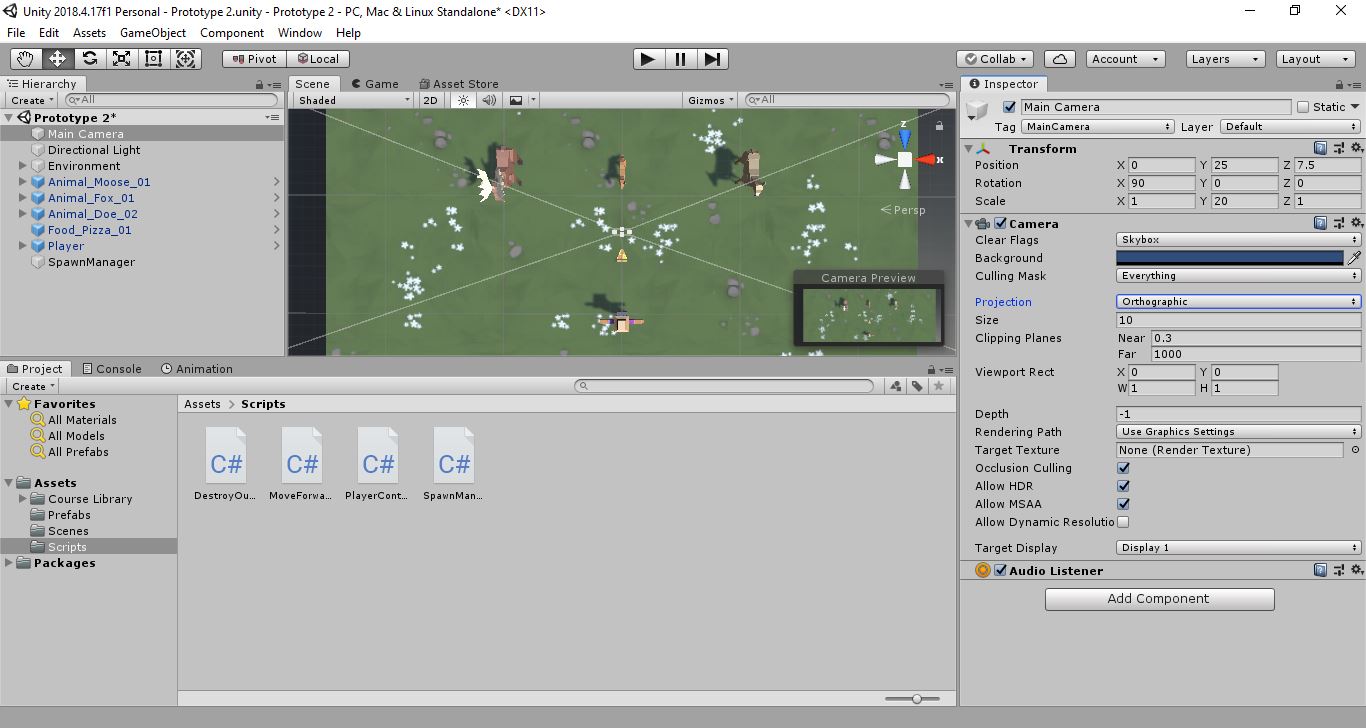
I found this tutorial much more challenging and difficult compared to the other past ones I have done. I would put in the texts into the C Sharp scripts but they wouldn't work and I would either have to close out of and reopen Unity to make work or redo the whole script again. I couldn't find out why this happened and it doing all this became way too time consuming. I got frustrated and gave up. I will discuss with my fellow students for help on the matter. Also, unlike the videos, I wasn't able to move my camera freely like I have been able to with the past tutorials. This didn't hinder me unlike the script issue but it would of been more helpful to have been able to move the camera to see the full scale of the project as I worked on it. But I did find making the background and obstacles move and having the player character stay mobile to simulate the illusion of the character moving forward and learning how to simulator movement like that really cool and fascinating. I hope to find out what's behind the issues I'm having and having them fixed so I can complete this tutorial.

(My Unity HUB while working on it)

Tuesday, 3 March 2020

Tutorial 5

I felt this tutorial went well. It was very rewarding finally completing the game and having it working properly. I didn't face any real issues or problems. The only thing I can this of is that when I went into game view, the animals spawned where the player character was. I soon discovered that in the code, I had a vector 3 as a vector 2. So I quickly changed it to a 3 and it worked perfectly. The main things I learned and enjoyed was writing script to make objects and shoot and be destroyed. I also quite enjoyed creating hit boxes. It's really interesting to learn first hand how games make player characters able to hit an enemy character. And creating a game over screen was also really cool. I didn't attempt the challenge due to time constants. If I have time in the future I may come back and attempt it. I know this blog is a bit short but I can't of anything else to say but I did have fun with this tutorial and can't wait for the next one!

(The game in action)

Sunday, 1 March 2020

Tutorial 4

I struggled a bit with this tutorial but I got through it in the end. At the beginning when I changed the names of the C Sharp scripts and drag them onto the assets it would give me an error message that it wasn't a Monobehavior script. I couldn't fix the issue so I gave up. The next day I tried again and added the titles to the scripts like in the videos but kept the Monobehavior at the end and it fixed the issue. I don't know why that happened given it didn't happen during tutorials two and three but I'm just glad I was able to get it working in the end. After that I found the rest of the tutorial simple and straight forward. I found learning how to code things like the invisible barriers to keep the player in the scene, having the player character shot out pizza with a press of the space button and having the animals spawn in random places very fun and rewarding. Coding without the auto filling like in the videos is still annoying and long but I still find the coding fun. So despite the issue at the beginning I enjoyed this one and am looking forward to the next part.

(Screenshot of my Unity HUD)

Saturday, 29 February 2020

Unity Tutorial 03

This weeks tutorial was a bit more tough than last weeks but nothing impossible or head melting. The only problem I had was at step 4, where I had to program the speed control of the car. I followed the video closely but I got an error message about multiple errors. I fixed the problem by redoing the whole code of that part of the tutorial from scratch and soon the problem was fixed. I guess that I forgot a common or symbol like this ; or something. Apart from that little hiccup the rest of the video. The challenge with programming the plane game on the other hand proved very challenging and honestly a bit too much for me. I was about to get it flying forward and slow it down but I struggled with the rest of it and having to catch up with a lot of work I decided to cut my losses and moved on to the next tutorial. I may go back on finish it at a latter date. But over all I felt the tutorial went well and I feel proud of making the car move like how it would move in a game like Grand Theft Auto or Saints Row, ETC.

(My Unity HUD as I work on the plane challenge)

Unity Tutorial 02

I found the first of these new Unity tutorials very simple and straight forward to understand. I feel it is defiantly an improvement from the Jimmy Vegas tutorials we used in Multimedia Development 1 last semester. The videos highlighted the specific parts of the layout to use for it. So I found it very enjoyable to use. I felt the first part was good refresher on the basics of Unity which helped me back into the groove of it. I learned some basic game coding from it. The coding side of Unity did not work for me last semester for reasons beyond my understanding but it all worked fine here. Though my computer just has notepad instead of the more fancy program in the video so I have to write all the code without any auto fill which can be long and lead to some mistakes on my part but it's nothing too bad. I didn't find anything really all that difficult but I'm sure that will change with the future tutorials. I also found it very rewarding to make the car move, it made feel like accomplished I thought I could never do. So I'm looking forward to doing the future tutorials.

(Screenshot of the car tutorial)

Thursday, 20 February 2020

Reading 2

The two topics I have chosen to write for the proposed are linear and non-linear stories and granularity. With my two topics chosen, I searched keywords based on the two topics. The words I came up with for linear and non-linear stories are linear, short, straightforward, non-linear and open. The words I came up with for granularity are granularity and detail. After I had my words, I watched the video on the matrix method and set up the the four folders. I set up a documents, matrix, paper and synthesis folder. I then downloaded the Arts Review Matrix spreadsheet. With all this done, I am ready to start my research.

(Screen Cap of Downloaded Matrix)

Sunday, 8 December 2019

The Magic Gate Beta

The development of the game have been a total disaster. I haven't been able to fix the collectible issue since my last blog post. Unlike my planning document there will no character model, NPCs, story, collectibles, enemies, combat, menus or displays. All the player can do is wander the map that has no borders. I'm honestly done trying with this project. It's a bust and it's caused me to fall behind on my other modules. So The Magic Gate is now "complete."

(The Final Product.)

Sunday, 17 November 2019

First Playable of The Magic Gate

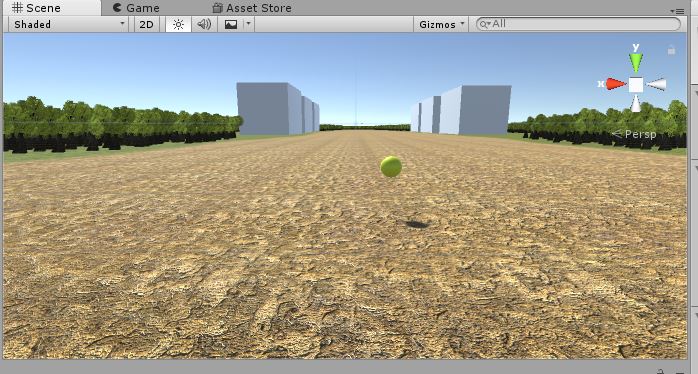
Progress on the game is going okay, nothing great. I've got most of the map built, the only thing I'm missing is the grass and the buildings. I have downloaded a fantasy house but am having difficulty putting it in so for the time being I have 3D rectangles as placeholders. I have all the collectibles placed around the map and I got them to rotate but I'm having difficulty getting the script to make the player pick up the orbs when the player walks into them. I'm also have difficulty with the player character. I tried to set up a third person character but the camera wouldn't follow them so for the time, I have a first person character in as a placeholder. I also made the world map bigger then I expected so I might have to increase the players speed to make up for it. I also need to add borders and a sky box to the game. So over all progress is okay but could be better.

(Overview of the game world)

(Player starting point)

Tuesday, 12 November 2019

Game Fun

This week I read the article "Natural Funitivity" by Noah Falstein. The article explored the question of what makes a fun game. He starts off by discussing what fun means as a concept and how it's hard to define. But he says it's linked to our ancestral sense of survival, saying that video games connect to our sense of survival which in turn if fun to us. He also listed the three types of fun we enjoy on a mental level. First is psychical fun, doing psychical activities appeals to our sense of survival. Social fun, where we like to interact with other people since we are social creatures. And finally mental fun, where enjoy challenges that make us think hard.

Link: https://www.gamasutra.com/view/feature/130573/natural_funativity.php?page=1

(A drawing of a caveman hunting. Found here.)

Sunday, 10 November 2019

Prototype

There's nothing much for this post due technical issues I'm have with Unity. But I did get some things done. I first drew out a world map with key for my game world.
(World Map)
I then drew a character sketch of the player character, Frank the Knight.
(Play Character sketch)
And I started work on my game but I'm having technical difficulties that I need to fix before I continue any further with it.

Saturday, 26 October 2019

Game Design Document

I found the GDD really difficult and really didn't understand it. I did my best to answer all of them but I didn't understand half the things it was asking me. I'll have to revisit it in the future to improve on it.

Link: https://www.dundoc.com/project/5832

(A video game knight. Found here.)

Sunday, 20 October 2019

Game Vision Statement

Introduction: The game is called "The Magic Gate", which is a 3D, open world game for the PC and Mac that will use the the proven Unity engine. The player will play as a nameless knight who while resting in a village, gets trapped in it when the evil wizard, Crulock, places a curse on the village where an invisible force traps the village and the woods around it and the only way out is through an enchanted gate that no one can open. The player is instructed by the village elder to gather thirty fairy dust orbs around the village and forest so they can cast a spell on the gate and set them all free.

Description: The game is set in a third person perspective where you as the knight have to roam and explore the village and the land and woods around it to find thirty fairy dust orbs to open the gate at the end of the village. Once in the game, you go where ever you feel without restrictions. Meaning you can either get starting on collecting or just explore the land. You can also talk with the people in the village who will give you more lore about the world of the game. This will be done through text boxes. You can also encounter skeletons who are trying to stop your quest and you can slay them using you sword. They will take one hit to take down but the player can only take three hits before they die. When they do, they will be sent back to the village where they started but they will still have all the fairy dust orbs they collected before dying. There will also be environmental hazards like rivers, pits and snakes that the player has to avoid. Like the skeletons, even the player gets hit by these three times they will die and be sent back to the village. The game is targeted at people between 7 - 20 years old because fantasy and collecthon games are usually timeless and appeal to all ages. The story will be light in tone with friendly villagers who will have funny dialogue. It will have the feeling like that of a fairy tale with minor dark elements here and there.

Key Features:
- Open 3D environment: The game will have a small but well filled 3D environment to roam and explore that was popular within the "Sly" series of games.

- Collectathon element: The game will have objects scattered around the world that the player must collect in order to complete it, similar to that in the "Banjo Kazooie" series of games.

- Story element: The will have an interactive world where the player can talk to the village people and learn more about the world and get more insight of it's history and why the wizard has trapped them, similar to the "Elder Scrolls" series of games.

Genre: "The Magic Gate" is a fantasy, adventure, collectathon game.

Platforms: The two only platforms for this game will be for the PC and Mac.

Sources: https://unity3d.com/make-a-game-in-unity-without-programming

(Free roaming in Final Fantasy XV. Source.)

Thursday, 17 October 2019

Unity Tutorial 3

For this weeks Unity tutorial we had to create a clock that actually tells the time. I enjoyed doing this task. The instructions where different this time, instead of having videos to follow, we were given a document with instructions and images to follow. I feared this would be hard to understand but it actually was easy and straight forward to follow. There where a few times I got confused by the wording but I did understand those parts after reading over them again. I also enjoyed slowly but surely building up the clock step by step. I felt this exercise helped me get better at using the positioning, rotation and scale in the transform. It also helped me get a better grip when it comes to assembling an object in Unity. I also taught me that Unity can be used for more than just video games. Unfortunately I couldn't fully complete the tutorial. When I was editing the script, I tried to do Hours Transformed part with the Hours Arm. But no matter what I did, it wouldn't accept it. I have no idea why this was the case but I hope to find out when I talk with my lecturer in the next lab.

(A screenshot of my clock in process)

Saturday, 12 October 2019

Feedback Strategies

The first article I read was "Preschoolers and Praise: What Kinds of Messages Help Kids Grow?" by Deborah Farmer Kris. I found the article to interesting and it's points helpful. The article talks about how young children are stilling trying to figure out self concept, i.e, who they are and what they can and can't do, and how parents can give feedback to help them develop a growth mindset. The first tip was to give kids process praise inside of generic praise, i.e, instead of saying "It looks nice!" when a kid shows the painting they made to instead say "It looks nice! I like how you used light blue for the sky!". The next tip was to teach kids the power of "Yet". So when someone says "I can't do it", you respond with "You can't do it yet!". And the final point was to tell kids story of resilience to help them understand that anything is possible, you just takes time and work. Overall, I find these tips will be helpful when I give feedback to others.
 https://www.kqed.org/mindshift/40369/preschoolers-and-praise-messages-that-can-help-kids-grow

The second article I read was "The Difference Between Praise and Feedback" by MindShift. I also found this article interesting and helpful. The article talks about how parents find it difficult on how to praise their children and it gives two examples of how to do it from two different researchers. The first way comes from Edward Deci and Richard Ryan and it is called process praise. This is where parents give feedback like "That was a clever way to figure it out" or "I really like how you used blue in this picture" to help give kids more confidence instead of giving generic feedback. The second way comes from Alfie Kohn and it is called praise and personhood. This where you don't praise your child for doing work because it makes them feel if they don't do these jobs well then they are not worthy of being loved. The article that says that overall, both methods boil down to praising how kids solve their problems and to ask them questions on how they did it.
https://www.kqed.org/mindshift/34778/the-difference-between-praise-and-feedback
(An installation of feedback. Found here.)

Game Idea Research

The game idea I am going with for my project is the collectathon idea. I am going with this idea because I feel it can be simple enough to do but allow me the space to be creative with it. The main mechanic for this game will be collecting objects around the open world, gathering a certain amount to complete the game. Another mechanic I was thinking of was combat. You will be able to attack and kill enemies in the world. And the last mechanic I was thinking of using was puzzle elements, where the player would preform puzzles like remember pasterns or moving objects in a certain to get access to items to collect.
(The titular characters of Banjo Kazooie collecting an object in the game. Found here.)

Tuesday, 8 October 2019

Game Elements

I found the main article on the week four reading page quite insightful. It gave a good basic introduction to atomic game elements like players, objectives, rules, resources, game state, information, sequencing, player interaction and theme and how they come together to form a game system. Finding out how these different elements can work together in so many different was, with the slightest change dramatically changing how a game works was fascinating. I also found the information on critical analysis very helpful. I've never really done critical analysis, so with the questions and points listed, it should be easier from now on.
https://view.officeapps.live.com/op/view.aspx?src=https%3A%2F%2Fwww%2Edropbox%2Ecom%3A443%2Fs%2F51gox34zmmjv3t3%2FWhat%2520are%2520the%2520Qualities%2520of%2520Games%2Edocx%3Fraw%3D1&wdAccPdf=0
(A game system. Found here.)

I could not read any other article because the link was not working. 

Sunday, 6 October 2019

Feedback Thoughts

The first article I read was "A fixed mindset could be holding you - here's how to change it" by Anna Kelsey -Sugg and Ann Arnold. The article is about how people have to mindsets, fixed and growth, saying how people have developed fixed mindsets, meaning they don't learn from mistakes and how a growth mindset helps people learn from their mistakes. I found the article fascinating. I agree with what it has to say about the negative effects of a fixed mindset and the positives of a growth mindset. I also like how they discuss how offices and companies can help their employees but rewording a growth mindset.
https://www.abc.net.au/news/2018-06-26/fixed-vs-growth-mindset-at-work-and-in-life/9897782

The second article I read was "Why rejection hurts so much - and what to do about it" by Guy Winch. The article is about how we all face rejection all the time, big and small, but it always hurts and how we could help lessen the pain. I found the article interesting and insightful. It's discussion on how we deal with rejection relatable. I also found the the advise given very helpful, like having zero tolerance for self-criticisms, reviewing you self-worth and talking to friends when you're rejected.
https://ideas.ted.com/why-rejection-hurts-so-much-and-what-to-do-about-it/

(Thumbs up and down. Found here.)

Game Brainstorm Ideas

My first game idea is a 3D platformer. The goal of the game would be for the player to make their way down to the end of a linear course while avoiding hazards and obstacles. The goal would be either to just get to the end of the course or get to the end before the timing runs out, the player failing if it does. There would be collectibles scattered on the course that the player can collect if they choose so. If it was the simple "reach the end" idea, it would add to a high score the player will get after completing the course, the more they collect, the higher the score. For the time trial idea, the collectibles would add more time to the timer, giving the player so choice if they choose so. The game wouldn't be very story driven. The rough idea of the plot I have is that someone wants a jar of peanut butter that lies at the end of the dangerous path, having a funny tone. The environment would be a grassy forest, a grass path the player goes down surrounded on both sides by trees. I've been a big fan of 3D platformers for a long time and I've always loved the idea of making my own one. My main inspiration for this game stems from games like Crash Bandicoot and Super Mario Galaxy, with their cartoon like style and their linear level designs.
(https://en.wikipedia.org/wiki/Crash_Bandicoot)
(A typical Crash level.)

My second game idea is a 3D collectaton. In this game, the player would have to collect objects around a small open world to complete it. I have two ideas for this concept. One would be like a 3D platfroming where the player has to navigate hazards to reach the items. The other concept would have it be like a puzzle game where the player has to solve logic puzzles to get the items. The game is story driven. The idea of I have for it is that a fantasy village has been cursed by an evil wizard to be trapped in an other dimension and you play as a knight who must gather the magical objects needed to open the gate and free the village. The story would be explained via narration and and talking to the villagers. The environment would be fantasy village and forest, with the village being safer while the forest would be dangerous.The obstacles the player would face would be environmental hazards like pits and enemies like skeletons for the player to avoid. The platformer concept was inspired bygames like Jak and Dexter while the puzzle concept was inspired by Portal.
https://en.wikipedia.org/wiki/Jak_and_Daxter
https://en.wikipedia.org/wiki/Portal_(video_game)
(Jak and Daxter poster as seen here.)

(Picture of how to solve puzzles in Portal. Found here.)

My third game idea is a 3D horror game. The goal of this game is try to escape a building while monsters are trying to find you. The game would be set in a free roam building where the player can walk and run and hide underneath desks and inside closets. The player would need to collect keys so they can open the exit door. The game would be story driven. The story would be that the player is a child who has been kidnapped by monsters to be eaten and you escape the cage but you must sneak your way out. The story would be told through dialogue from the monsters. The game environment would be a decrepit building, either an abandoned hotel, factory, hospital or school. The hazards of the game would be the monsters who would roam the hallways looking for the player. The game was inspired by horror games like Slenderman.
https://en.wikipedia.org/wiki/Slender:_The_Eight_Pages
(Picture of the Slenderman in game. Found here.)

My forth game idea is a 3D turn based RPG. The goal of the game is defeat enemies to gather and collect the objects once the player defeats them. The game would be open world game. It would be story driven. The game would be about a group of three superheroes who must defeat several monsters and recover stolen technology they're collecting to create a super weapon. It would a story driven, delivered through cutscenes and text boxes. It would have a action but lighthearted tone. The environment would be a city, taking place on the streets. The hazards in the game would be the monsters you fight which only happens when the player goes up to them where it turns into a turn based battle. Here the play will have plan out attacks to beat the monsters. Each of  the heroes will have a turn. The fighter hero will be an rounded fighter. The strong hero will be powerful and the defense hero would be able to heal themselves or the others. I was inspired by the Pokemon video game franchise.
(The Pokemon logo. Found here.)

Tuesday, 1 October 2019

Game Elements

The first article I read was "Formal Abstract Design Tools" by Doug Church. I found article really hard to read. It had a lot of technical jargon that I had a hard time understanding. But it did given me a bit of an inside look at some tools of game design like intention, perceivable consequence and story and how they can work well together in certain games types and not so in other games types. 
https://www.gamasutra.com/view/feature/131764/formal_abstract_design_tools.php

The second article I read was "A Look at Negative Game Mechanics" by Josh Bycer. I quite liked this article. It was much easier to understand and follow. It talked about game mechanics that are designed to force the player to spend money to play the game, from arcade machines in the nineties to free to play and social media games and why such mechanics should be avoided.
https://www.gamasutra.com/blogs/JoshBycer/20120903/177027/A_Look_At_Negative_Game_Mechanics.php

The third and final article I read was "The Paper Chase Saving Money Paper Prototyping" by John Henderson. The article was going over what game designer, Giles Schildt, said to game design students at a talk at the community college. I liked the article and the idea of designing a game prototype on paper before moving onto actually making the game, since it'll make the design easier to understand for everyone and that it's easy to scrap and change.
https://www.gamasutra.com/view/feature/2690/the_paper_chase_saving_money_via_.php

(A picture of a designer working on a game. Found here.)

Saturday, 28 September 2019

Time Management

Time management is something I do struggle with but I have gotten better at it. The weekly calendar seems like it'll be a great tool to help me keep onto of the workload. Reading was something I didn't do a lot during the first year but now I'm going to make an effort to read as much of the lecture notes as I can and take notes as I do. I want to try get some extra work done to act as a buffer in case I can't complete a task for whatever reason during a week but I'll have to see as I'll have to balance my work of the other modules. Working ahead is a great idea and I'm going to try and do that but again, I'll have to see given that I have balance my other modules too.

The read two articles. The first one I read was How to Beat Procrastination by Caroline Webb. I found the article to be really helpful. All the advice in it is simple and easy to do and I feel it'll help me when doing my college work. The second article I read was The Myth of too Busy by Tim Grahl. I found the advice in it good but I didn't like the tone of it. It felt kind judgmental in my opinion.

(An image representing procrastination. Found here.)