Sunday, 8 December 2019

The Magic Gate Beta

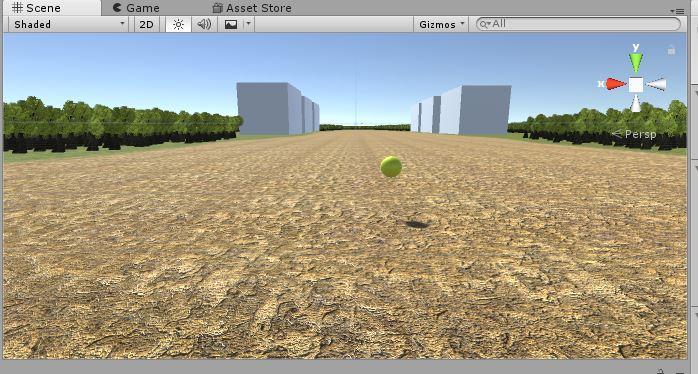
The development of the game have been a total disaster. I haven't been able to fix the collectible issue since my last blog post. Unlike my planning document there will no character model, NPCs, story, collectibles, enemies, combat, menus or displays. All the player can do is wander the map that has no borders. I'm honestly done trying with this project. It's a bust and it's caused me to fall behind on my other modules. So The Magic Gate is now "complete."

(The Final Product.)

Sunday, 17 November 2019

First Playable of The Magic Gate

Progress on the game is going okay, nothing great. I've got most of the map built, the only thing I'm missing is the grass and the buildings. I have downloaded a fantasy house but am having difficulty putting it in so for the time being I have 3D rectangles as placeholders. I have all the collectibles placed around the map and I got them to rotate but I'm having difficulty getting the script to make the player pick up the orbs when the player walks into them. I'm also have difficulty with the player character. I tried to set up a third person character but the camera wouldn't follow them so for the time, I have a first person character in as a placeholder. I also made the world map bigger then I expected so I might have to increase the players speed to make up for it. I also need to add borders and a sky box to the game. So over all progress is okay but could be better.

(Overview of the game world)

(Player starting point)

Tuesday, 12 November 2019

Game Fun

This week I read the article "Natural Funitivity" by Noah Falstein. The article explored the question of what makes a fun game. He starts off by discussing what fun means as a concept and how it's hard to define. But he says it's linked to our ancestral sense of survival, saying that video games connect to our sense of survival which in turn if fun to us. He also listed the three types of fun we enjoy on a mental level. First is psychical fun, doing psychical activities appeals to our sense of survival. Social fun, where we like to interact with other people since we are social creatures. And finally mental fun, where enjoy challenges that make us think hard.

Link: https://www.gamasutra.com/view/feature/130573/natural_funativity.php?page=1

(A drawing of a caveman hunting. Found here.)

Sunday, 10 November 2019

Prototype

There's nothing much for this post due technical issues I'm have with Unity. But I did get some things done. I first drew out a world map with key for my game world.
(World Map)
I then drew a character sketch of the player character, Frank the Knight.
(Play Character sketch)
And I started work on my game but I'm having technical difficulties that I need to fix before I continue any further with it.

Saturday, 26 October 2019

Game Design Document

I found the GDD really difficult and really didn't understand it. I did my best to answer all of them but I didn't understand half the things it was asking me. I'll have to revisit it in the future to improve on it.

Link: https://www.dundoc.com/project/5832

(A video game knight. Found here.)

Sunday, 20 October 2019

Game Vision Statement

Introduction: The game is called "The Magic Gate", which is a 3D, open world game for the PC and Mac that will use the the proven Unity engine. The player will play as a nameless knight who while resting in a village, gets trapped in it when the evil wizard, Crulock, places a curse on the village where an invisible force traps the village and the woods around it and the only way out is through an enchanted gate that no one can open. The player is instructed by the village elder to gather thirty fairy dust orbs around the village and forest so they can cast a spell on the gate and set them all free.

Description: The game is set in a third person perspective where you as the knight have to roam and explore the village and the land and woods around it to find thirty fairy dust orbs to open the gate at the end of the village. Once in the game, you go where ever you feel without restrictions. Meaning you can either get starting on collecting or just explore the land. You can also talk with the people in the village who will give you more lore about the world of the game. This will be done through text boxes. You can also encounter skeletons who are trying to stop your quest and you can slay them using you sword. They will take one hit to take down but the player can only take three hits before they die. When they do, they will be sent back to the village where they started but they will still have all the fairy dust orbs they collected before dying. There will also be environmental hazards like rivers, pits and snakes that the player has to avoid. Like the skeletons, even the player gets hit by these three times they will die and be sent back to the village. The game is targeted at people between 7 - 20 years old because fantasy and collecthon games are usually timeless and appeal to all ages. The story will be light in tone with friendly villagers who will have funny dialogue. It will have the feeling like that of a fairy tale with minor dark elements here and there.

Key Features:
- Open 3D environment: The game will have a small but well filled 3D environment to roam and explore that was popular within the "Sly" series of games.

- Collectathon element: The game will have objects scattered around the world that the player must collect in order to complete it, similar to that in the "Banjo Kazooie" series of games.

- Story element: The will have an interactive world where the player can talk to the village people and learn more about the world and get more insight of it's history and why the wizard has trapped them, similar to the "Elder Scrolls" series of games.

Genre: "The Magic Gate" is a fantasy, adventure, collectathon game.

Platforms: The two only platforms for this game will be for the PC and Mac.

Sources: https://unity3d.com/make-a-game-in-unity-without-programming

(Free roaming in Final Fantasy XV. Source.)

Thursday, 17 October 2019

Unity Tutorial 3

For this weeks Unity tutorial we had to create a clock that actually tells the time. I enjoyed doing this task. The instructions where different this time, instead of having videos to follow, we were given a document with instructions and images to follow. I feared this would be hard to understand but it actually was easy and straight forward to follow. There where a few times I got confused by the wording but I did understand those parts after reading over them again. I also enjoyed slowly but surely building up the clock step by step. I felt this exercise helped me get better at using the positioning, rotation and scale in the transform. It also helped me get a better grip when it comes to assembling an object in Unity. I also taught me that Unity can be used for more than just video games. Unfortunately I couldn't fully complete the tutorial. When I was editing the script, I tried to do Hours Transformed part with the Hours Arm. But no matter what I did, it wouldn't accept it. I have no idea why this was the case but I hope to find out when I talk with my lecturer in the next lab.

(A screenshot of my clock in process)